Nekogram
Screenshots
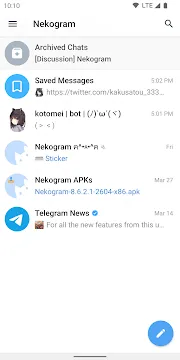
Nekogram provides a fast and highly customizable messaging environment for modern mobile users. This lightweight app connects directly to the official Telegram network audience. Moreover, users experience impressive connection speeds during daily text exchanges across distributed cloud servers.
In addition, Nekogram operates as a modified open source client based on original Telegram code. The platform offers custom interface modifications similar to popular options like Forkgram. Consequently, managing personal discussions and privacy settings becomes far more convenient and pleasant.
Nekogram Overview and Communication Experience
Nekogram improves standard messaging workflows by introducing flexible open source system modifications. Communication relies on the strong Telegram infrastructure to ensure fast and reliable data transmission. Therefore, you always stay connected with all your registered contacts without experiencing delays.
Furthermore, Nekogram includes additional practical features not found inside official applications. This platform mirrors Forkgram by offering advanced control options for private chats and visual elements. As a result, group conversations remain smooth, secure, and highly productive at all times.
How to Use the App for Telegram Messaging
To start using Nekogram, enter your active mobile phone number on the initial setup screen. First, receive the verification code sent to your existing Telegram account profile. After that, your entire chat list synchronizes instantly across your display screen.
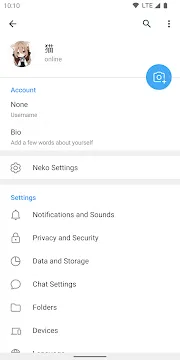
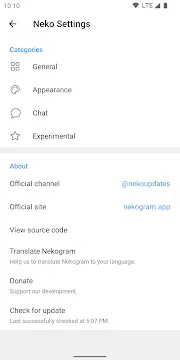
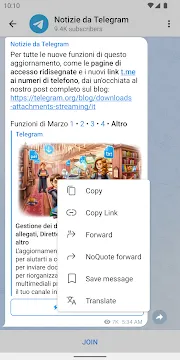
Next, open the settings menu in Nekogram to access deep visual customization options. Like Forkgram, you can create custom chat folders to organize separate conversations cleanly. Consequently, tapping any foreign text message activates instant built in translation tools.
Key Features of Nekogram App For Android
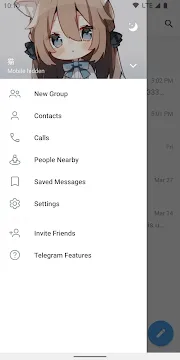
Nekogram includes numerous advanced utilities designed to elevate daily user messaging. Readers can personalize nearly every visual component visible inside the app windows. For example, user avatar backgrounds can appear behind side drawer menu headers.
Moreover, intelligent system optimization reduces battery consumption during active chat sessions. Text rendering remains exceptionally smooth even when scrolling through large chat groups. Therefore, user navigation stays fluid and enjoyable throughout long messaging sessions.
Built in Multi Engine Translator
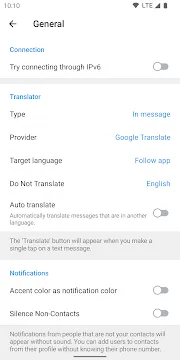
Nekogram features an integrated translation module directly inside active conversation threads. Users can convert incoming foreign messages into their preferred language with one tap. In addition, the system supports multiple translation engines for maximum linguistic accuracy.
Furthermore, you can enable automatic translation for specific individual channels and chats. This feature eliminates the requirement to copy text into external translation tools manually. Consequently, global communication occurs smoothly without interrupting your natural reading workflow.
Extensive Appearance Customization
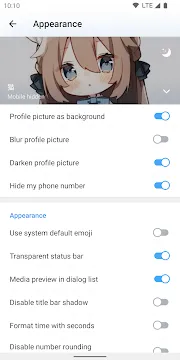
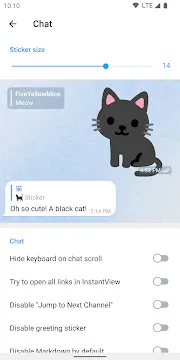
Personalizing chat aesthetics becomes effortless through the visual configuration settings in Nekogram. You can adjust sticker dimensions to fit your ideal reading layout. Moreover, users can activate transparent status bars to create a stylish display appearance.
In addition, custom theme support allows complete control over application color schemes. You can apply system emojis or choose native device font styles easily. As a result, your messaging layout reflects your exact personal aesthetic choices.
Automatic Video Playback Control
Managing background media playback operates intelligently within this communication tool. For instance, active video clips automatically pause when you exit the main window. Therefore, you never lose your playback position when switching between active tasks.
Meanwhile, media buffering functions efficiently to minimize mobile data consumption. Users can adjust auto download rules for incoming video files and image attachments. Consequently, video playback remains convenient while keeping data usage under control.
Improved Forwarding Page Organization
Organizing shared content across contacts stays highly practical inside Nekogram. Chat folders appear directly on the message forwarding selection page during operation. In addition, this visual layout reduces search time when sending media files to group members.
Furthermore, users can replace standard forwarding menus with quick forward shortcuts. This adjustment accelerates file sharing during fast moving group discussions. Therefore, distribution of documents and images takes only a fraction of the time.
Free Audio to Text Transcription
Converting incoming voice recordings into written readable notes functions smoothly inside Nekogram. The built in speech parser converts audio clips into clear text instantly. For example, this feature helps immensely when listening to audio becomes difficult in public places.
Moreover, text transcription saves valuable time when checking long voice messages. Users can read through lengthy voice notes in just a few seconds. Consequently, communication productivity increases significantly during busy working hours.
Enhanced Account Privacy Tools
Protecting user conversations remains a primary objective inside Nekogram security settings. You can assign unique passcodes to lock separate user accounts individually. Furthermore, users can hide sensitive profiles completely from the main navigation menu.
In addition, options to manage message deletion histories give users complete administrative authority. You can clean up old message logs before specified dates automatically. As a result, private data stays protected against unauthorized local access.
Cloud Data Synchronization
Nekogram synchronizes your full message history across all registered devices in real time. Your drafts, photos, and chat logs remain accessible wherever you log in. Therefore, switching from mobile phones to desktop screens occurs without losing message progress.
Moreover, cloud storage stores your personal configuration settings securely online. You can back up custom visual themes and layout preferences effortlessly. Consequently, setting up new devices takes only seconds without reconfiguring manual options.
How to Download and Install Nekogram APK
Click the download button on our website to begin acquiring the latest Nekogram package file. Before starting the process, check that your device permits installations from authorized file storage locations. After that, open your file management tool to locate the saved package quickly.
- Firstly, tap the primary download button to save the official package file.
- Secondly, navigate to device settings to enable installation permissions for local files.
- Thirdly, launch your local file manager app to find the downloaded item.
- Fourthly, tap the installer package to initiate the automated setup routine.
- Fifthly, confirm required permissions on screen to finalize the system installation.
- Finally, launch the newly added Nekogram icon to set up your profile.
Useful Nekogram ِApp Messaging Tips and Tricks
- Activate Automatic Translation: Turn on auto translation within Nekogram chat settings to translate foreign text instantly without manual taps.
- Adjust Sticker Display Dimensions: Use the visual slider inside Nekogram options to shrink or enlarge sticker icons on your screen.
- Hide Lower Navigation Bar: Disable the bottom menu bar inside appearance settings to gain extra viewing space for message lists.
- Set Individual Account Passcodes: Create separate lock codes inside Nekogram security options to secure individual profiles from unauthorized local viewing.
- Enable System Emoji Styles: Switch the emoji preferences to display native operating system icons across all your personal conversations.
- Backup Custom Layout Settings: Save your preferred Nekogram preferences to cloud storage to restore custom configurations on new mobile devices.
Conclusion
In conclusion, Nekogram provides an exceptional communication platform for users seeking speed and deep customization. Intelligent translation features and flexible theme options make daily chatting effortless. Furthermore, reliable cloud synchronization keeps your messages secure across all active devices.
To sum up, this application combines strong privacy controls with practical interface enhancements. Managing group conversations and media files becomes far more organized and convenient. Therefore, upgrading your messaging experience with Nekogram remains an excellent choice.